
Introduction
Search engine optimization isn’t just about great content and backlink building. If your website has technical problems, even the best content may never reach the top of Google. Technical SEO focuses on improving the backend structure of your website so that search engines can crawl, index, and rank your pages effectively.
In this complete Technical SEO checklist, you’ll learn both beginner-friendly and advanced strategies to fix performance issues, boost rankings, and ensure your website is fully optimized in 2025.
What Is Technical SEO?
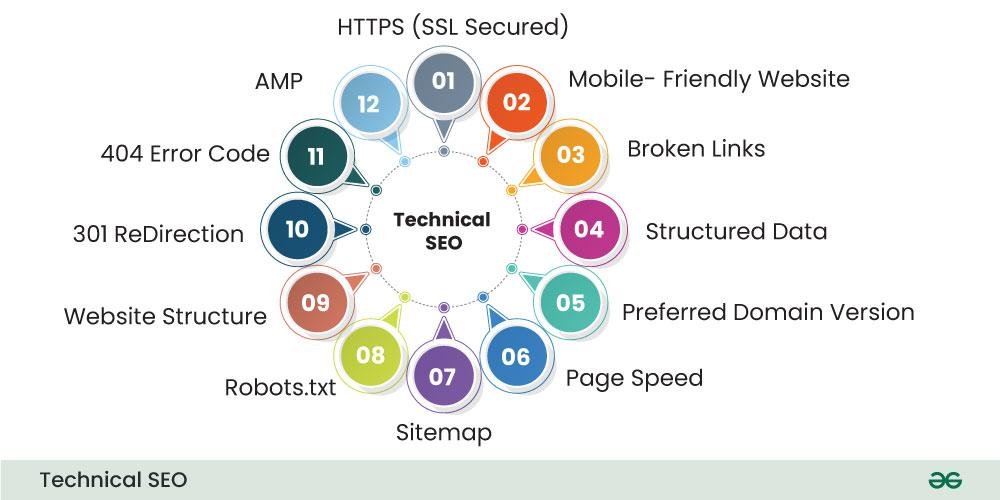
Technical SEO refers to optimizing your website’s infrastructure to help search engines better access, understand, and index your content. It focuses on areas like:
- Website speed
- Mobile friendliness
- Crawling & indexing
- Secure connections (HTTPS)
- Site structure
- Core Web Vitals
Unlike on-page SEO, which deals with content and keywords, and off-page SEO, which focuses on backlinks, technical SEO ensures your site functions smoothly for both users and bots.
Beginner Technical SEO Checklist
1. Make Your Website Mobile-Friendly
Google follows mobile-first indexing, meaning it mostly uses the mobile version of a site for ranking. Use responsive design so your website adjusts to all screen sizes.
🔧 Tool to check: Google Mobile-Friendly Test
2. Improve Website Speed
A slow website increases bounce rate and reduces rankings. Aim for page load time under 3 seconds.
Speed tips:
- Compress images
- Enable browser caching
- Minify CSS and JavaScript
- Use a CDN
🔧 Tools: PageSpeed Insights, GTmetrix
3. Fix Broken Links (404 Errors)
Broken links harm user experience and SEO. Use a crawler to identify and redirect them.
🔧 Tools: Screaming Frog, Ahrefs Broken Link Checker
4. Create and Submit XML Sitemap
An XML sitemap tells search engines which pages to crawl and index.
✅ Submit your sitemap in Google Search Console.
Example:yourwebsite.com/sitemap.xml
5. Use HTTPS Security
Google prefers secure sites. Install an SSL certificate and move your website from HTTP to HTTPS.
If your site shows “Not Secure” – fix it immediately.
Advanced Technical SEO Checklist
6. Optimize Website Architecture
Keep your site structure simple and clear:
- No important page more than 3 clicks away from homepage
- Use categories and subcategories
- Use breadcrumb navigation
A clean structure improves crawlability and user experience.
7. Implement Schema Markup
Structured data helps search engines understand your content and can increase rich results like stars, FAQs, and featured snippets.
Example types:
- Article schema
- Product schema
- FAQ schema
- Review schema
🔧 Tool: Schema Markup Generator
8. Improve Core Web Vitals
Google uses Core Web Vitals as ranking signals.
Focus on improving:
- LCP (Largest Contentful Paint) – Under 2.5s
- FID (First Input Delay) – Under 100ms
- CLS (Cumulative Layout Shift) – Under 0.1
Optimizing images, fonts, and scripts can significantly improve these metrics.
9. Control Crawling With Robots.txt
Your robots.txt file tells search engines which pages to crawl or ignore.
Example:
User-agent: *
Disallow: /wp-admin/
Allow: /
Make sure important pages are not blocked by mistake.
10. Fix Duplicate Content
Duplicate content confuses search engines and can cause ranking drops.
Use:
- Canonical tags
- 301 redirects
- Noindex tag (if needed)
This tells Google the original page to index.
11. Enable Lazy Loading for Images
Lazy loading delays the loading of off-screen images until the user scrolls, improving page speed and performance.
12. Optimize for Indexing
Use Google Search Console to check:
- Index coverage report
- Pages excluded from indexing
- Crawled but not indexed pages
Resubmit those pages after fixing issues.
Final Thoughts
Technical SEO is the foundation of your website’s success. Without fixing technical issues, your content and backlink efforts won’t deliver results. By following this Technical SEO checklist for beginners & experts, you’ll create a website that loads fast, is easy for search engines to crawl, and provides a smooth user experience.
When combined with:
✅ On-page SEO
✅ Off-page SEO
✅ Quality Content
✅ User Experience
…your rankings and traffic can grow exponentially in 2025.
If you haven’t yet, check out our previous guides:
Together, they form your complete SEO success system.
FAQs for this Blog
1. What is technical SEO?
Technical SEO focuses on optimizing a website’s backend structure to improve crawling, indexing, and search rankings.
2. Why is technical SEO important?
Without technical SEO, search engines may not properly find or rank your content, resulting in lower visibility.
3. What are Core Web Vitals?
They are performance metrics (LCP, FID, CLS) used by Google to evaluate page speed and user experience.
4. How often should I do a technical SEO audit?
At least once every 3–6 months or after major site changes.
5. Which tools help with technical SEO?
Google Search Console, Screaming Frog, PageSpeed Insights, Ahrefs, and GTmetrix.
For deeper learning, you can explore more Digital Marketing Blogs at:
SEO Strategies : On-Page, Off-Page & Technical SEO
11 Proven Ways How SEO Can Help Your Business Grow Faster
10 SEO Tools Every Marketer Should Use
Pingback: SEO Strategies : Complete On-Page, Off-Page & Technical SEO - Website